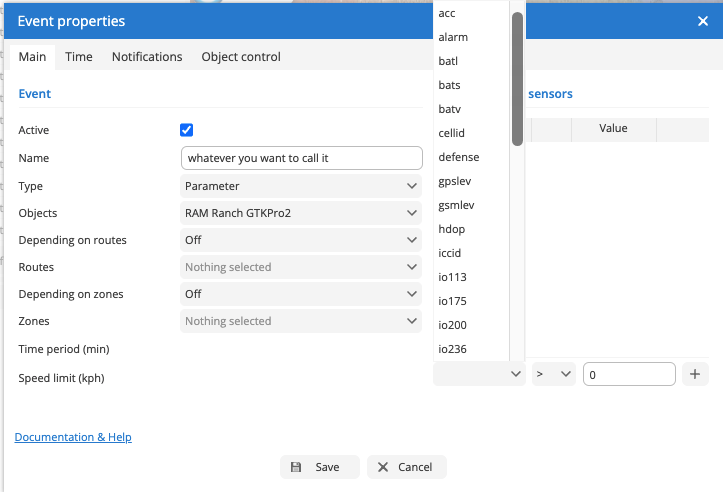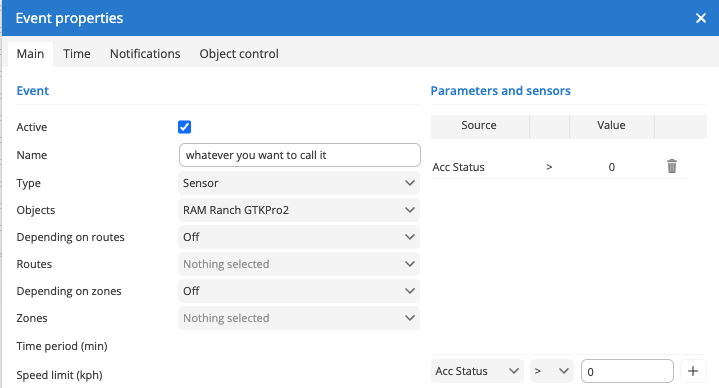
This is a default trigger so will not require adding, just as an example on how to add a specific trigger/event.
- Please login to https://gator.net.au/
- Click on "Settings" button (on the top left hand corner menu bar).
- Select "Event Triggers" tab and click on Plus sign (Button) then it will pop up the "Event Properties" window.
- Please set following values under "Event Properties"
- Name : Whatever you weant to call it Ex: Ignition On / Engine On / Gator Engine Status /GATOR GTKPRO2 Engine on.
- Type : Select "Sensor" from the drop down menu.
- Object : Select your preferred Object.
- Depending on routs : leave as off if you do not want to select a route.
- Routes: previous values was off. therefore, you would not be able to change this and it would be greyed out (nothing Selected).
- Depending om Zones : leave as off if you do not want to select a Zones.
- Zones: previous values was off. therefore, you would not be able to change this and it would be greyed out (nothing Selected).
- Under Parameters and sensors : Select "ACC Status" and from next drop down menu select " > " (equal sign) and on text box type 0 (Zero) Then press the + sign button and SAVE button.
- Please don't forget the "Notification" tab on "Event Properties" and set preferred email address and mobile number.
Acc/Ignition whilst technically different are interchangeable in this regard. In fact Ignition is actually more accurate because how we recommend to have wired it already uses this sensor to record the event.