How do I set up a new trigger/alert?

This is a default trigger so will not require adding, just as an example on how to add a specific trigger/event.

  • Please login to https://gator.net.au/
  • Click on "Settings" button (on the top left hand corner menu bar).
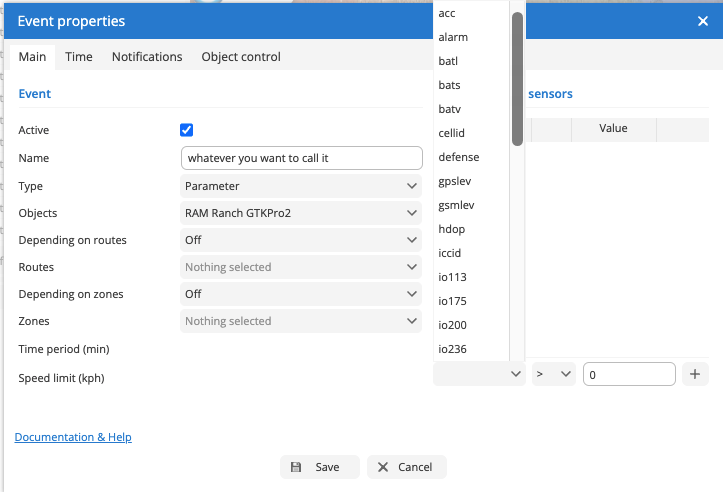
  • Select "Event Triggers" tab and click on Plus sign (Button) then it will pop up the "Event Properties" window.
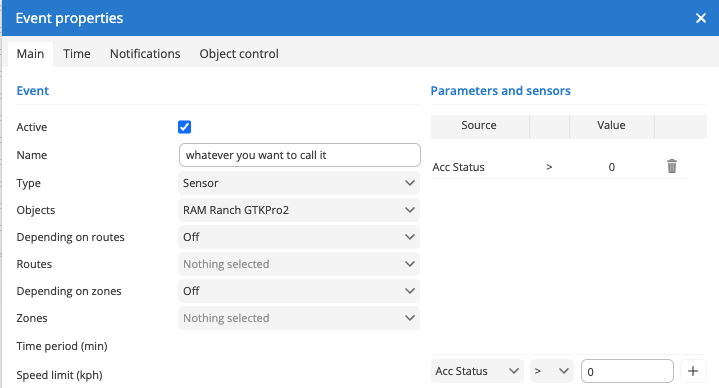
  • Please set following values under "Event Properties"
  • Name : Whatever you weant to call it Ex: Ignition On / Engine On / Gator Engine Status /GATOR GTKPRO2 Engine on.
  • Type : Select "Sensor" from the drop down menu.
  • Object : Select your preferred Object.
  • Depending on routs : leave as off if you do not want to select a route.
  • Routes: previous values was off. therefore, you would not be able to change this and it would be greyed out (nothing Selected).
  • Depending om Zones : leave as off if you do not want to select a Zones.
  • Zones: previous values was off. therefore, you would not be able to change this and it would be greyed out (nothing Selected).
  • Under Parameters and sensors : Select "ACC Status" and from next drop down menu select " > " (equal sign) and on text box type 0 (Zero) Then press the + sign button and SAVE button.
  • Please don't forget the "Notification" tab on "Event Properties" and set preferred email address and mobile number.

Acc/Ignition whilst technically different are interchangeable in this regard. In fact Ignition is actually more accurate because how we recommend to have wired it already uses this sensor to record the event.

Editing Objects

-- In progress --

Legacy Server

NOTE: ALL 3G TRACKERS WILL NO LONGER WORK DUE TO THE GOVERNMENT SHUTDOWN OF 3G SERVICE WITHIN AUSTRALIA. THE BELOW GUIDES ARE NO LONGER RELEVANT

This page serves as a warning that the gtrack3g.com and gtrack3g.com.au services have been completely retired by the upstream provider.

All 3G services no longer operate in Australia.

International users who happen to have a working 3G services are still able to migrate devices to our Gator Tracking Portal: CLICK HERE

Privacy Policy - Mobile App

Last Updated: February 25, 2026

TDJ Australia Pty Ltd has built the Gator Tracking App for use with Gator branded GPS Tracking devices. The use of the app is free and is available to download from the Apple App Store or Google Play Store. The use of this system is provided at no cost and is intended for use as designed. There are paid elements that do require a subscription, you must subscribe on our website to add those.

How to cancel a subscription

Thanks for being a subscriber!

If you've sold the car or wish to cancel this trackers subscription for some reason, we fully support that.

Cancel any Subscription.

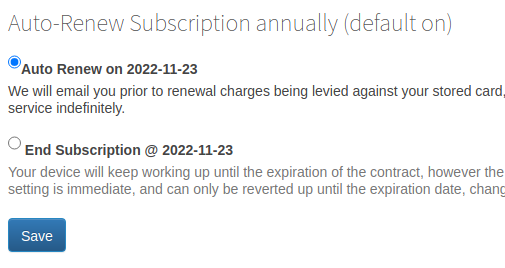
  1. login to gator.net.au and
  2. Click on "Add Subscription" button on the left, then select the appropriate "Manage Subscription" link for the subscription you longer wish to renew.
  3. Select the option "Do not Auto Renew"
  4. Select "Save"

Auto Renew Image

Undo a cancellation ?

Changing that back to Auto Renew will resume the subscription and resume charging you annually, as per the agreement. However: If you wait until AFTER a cancelled subscription has ended you will no longer be able to resume. To rectify this, you must contact us to remove the subscription entirely, then setup a new one.

Important note: If you sold your vehicle with the tracker in it, you should immediately cancel your subscription and delete the object from your account. It is very likely that you have a legal obligation to do this before they take possession.