
Remote Ignition Disable
-
The Gator tracking units GTKPRO2 - GTKPRO3 -GTKLITE can be connected during installation to an ignition disable (immobiliser) circuit in your vehicle.
-
Once wired correctly by a qualified installer, this function allows you to remotely cut power to the ignition circuit, preventing the vehicle from starting while it is parked or stationary.
-
You activate the immobilisation from the Gator Tracking app or the web portal by sending a command if the relay is wired up.
How It Works
-
A relay included in the wiring harness (or added during installation) is used to interrupt the ignition circuit when commanded.
-
The tracker itself communicates with your vehicle’s electrical system and the Gator server so you can control or trigger the immobiliser from your smartphone or online.
-
This works not only when the vehicle is off (not in motion), but also has a low speed dependant activation of 25kph if the vehicle gets stolen.
How You Use the Feature
-
From the App: Tap a button to activate the immobiliser once the relay is installed and configured.
-
From the Web Portal: Send a command to the device to trigger the ignition cut-off via the online control interface.
Notes & Requirements
-
The immobiliser capability requires correct wiring during installation (best done by a qualified auto electrician/mechanic) so the relay can safely interrupt the ignition circuit.
-
A paid Gator tracking subscription and active SIM service are needed for remote commands and control.
The finer details for the people that want to know the nuts & bolts of how it works.
The installation must be carried out according to the following diagram.
We highly recommended having the tracker professionally installed.
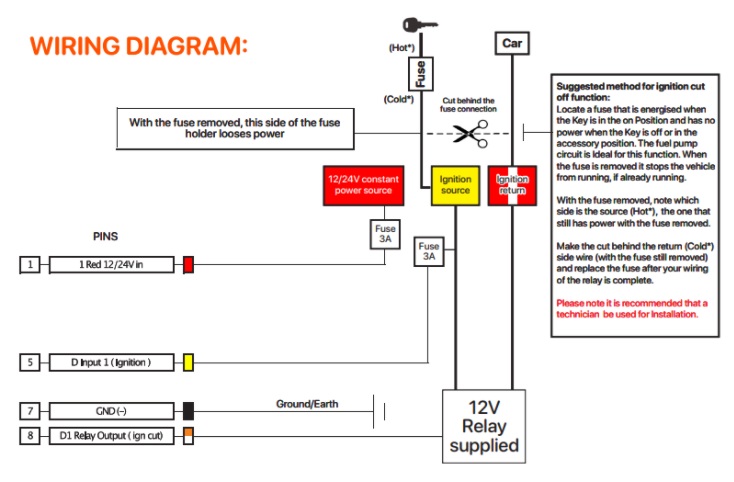
The number (8) Orange/white wire - D1 Relay output - is the earth/ground switch to the relay, the relay itself will only ever activate when the ignition is turned ON, It stays in a "READY STATE" while the ignition is OFF to activate when required.
This saves the vehicle’s battery use when not actively required.
Once the “DISABLE VEHICLE” feature has been activated and the “COMMAND SUCCEEDED” message has been seen on the mobile device, the tracker activates the earth connection to the relay.
The “Immobilized” notification and “Vehicle Disable” is visible after the server refreshes the information.
The first image is the disable activation button on the app, second image is the app alert showing the command has succeeded, the third image is once the tracker has activated the disable feature
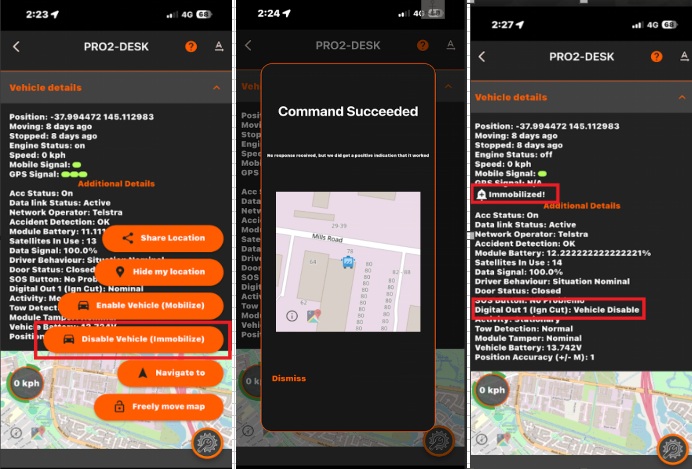
The enable feature is just the reverse, once the “ENABLE VEHICLE” option is pressed, the same alert will show, and the earth trigger will be turned off. Allowing the vehicle to run as intended. If for any reason the GPS level is very low, such as an underground car park, the system will automatically upgrade the message to send an SMS to the tracker to ensure the system activates as it should.